
-
- Digital Marketing
-
 Perf. Marketing
 E-mail Marketing
 PPC Services
 Video Marketing
 Influencer Marketing
- Social Media
 Facebook Marketing
 Instagram Marketing
 Twitter Marketing
 Pinterest Marketing
 TikTok Marketing


-
- Digital Marketing
-
Perf. Marketing
- E-mail Marketing
- PPC Services
- Video Marketing
- Influencer Marketing
- Social Media
- Facebook Marketing
- Instagram Marketing
- Twitter Marketing
- Pinterest Marketing
- TikTok Marketing
Blog
Sitemap Index File: How to Manage Large Websites

Want a Quick Summary?
Summarize this article instantly with ChatGPT.
For growing websites, managing URL discovery and crawl efficiency becomes a complex technical challenge. While a single XML sitemap works well for smaller sites, enterprise platforms, large e-commerce catalogs, news publishers, and dynamic web portals quickly hit structural boundaries defined by search engine protocols.
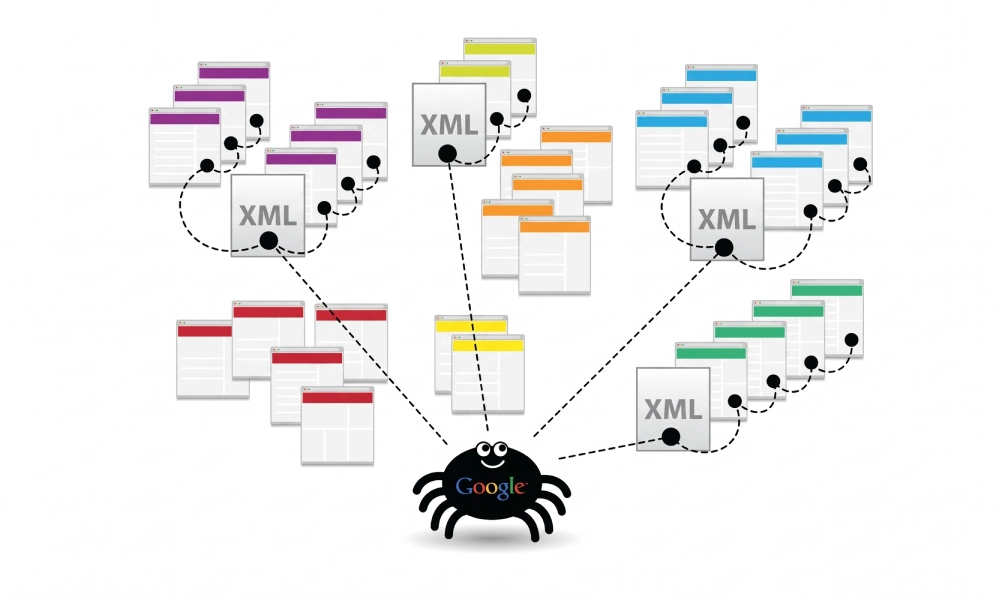
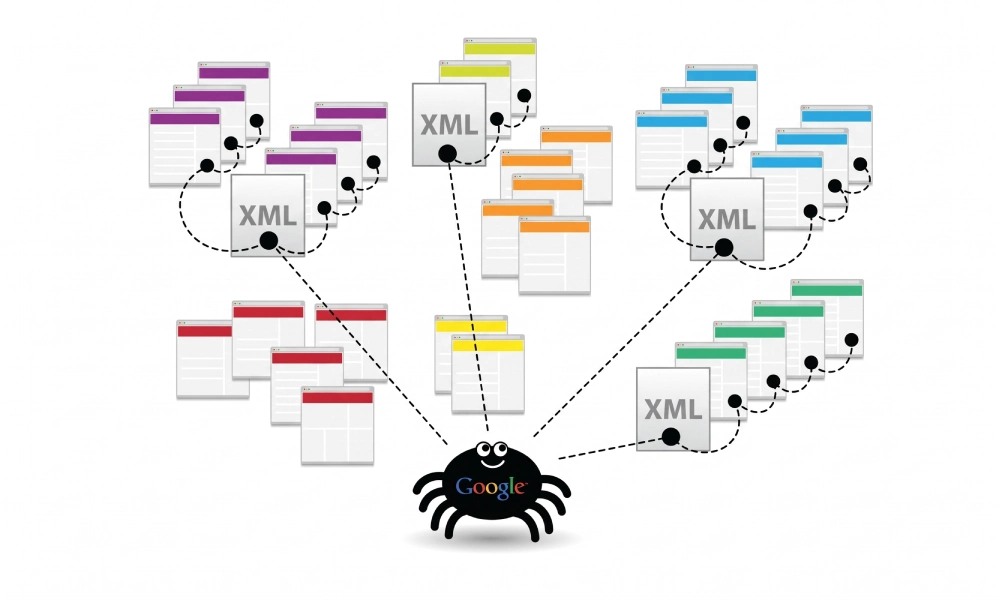
To overcome these scale limits without creating crawl bottlenecks, search engines rely on a sitemap index file. An index file acts as a parent master directory that organizes multiple individual XML sitemaps into a single, cohesive feed. Learning how to architect, split, and maintain a sitemap index ensures search crawlers like Googlebot and Bingbot index your high-value pages without dropping URLs due to size restrictions.
The Protocol Limits of a Single XML Sitemap
The universal Sitemaps.org protocol, supported by Google, Microsoft Bing, and other major engines, enforces two strict hard ceilings on any single XML sitemap document:
- Maximum URL Count: Exactly 50,000 URLs per file.
- Maximum File Size: Exactly 50 Megabytes (MB) uncompressed.
If your sitemap file exceeds either limit, search engine parsers will reject the file, drop subsequent entries, or generate fatal processing errors in Google Search Console. Even if your website has only 30,000 URLs, embedding heavy metadata (such as image extensions, video tags, or alternate hreflang references) can easily push the raw XML file size past the 50MB mark. A sitemap index file solves this by splitting entries across manageable sub-sitemaps.
What Is a Sitemap Index File?
A sitemap index file is an XML document that lists the locations of subordinate child sitemaps rather than individual page URLs. Instead of wrapping individual page entries inside a <urlset> container, it uses the <sitemapindex> parent tag, with each child sitemap defined within a <sitemap> element.
When you submit a single master sitemap index to Google Search Console or reference it in your robots.txt file, search crawlers automatically read the index, fetch each linked sub-sitemap, and parse all child URLs.
XML Syntax and Structure of a Sitemap Index
A compliant sitemap index file adheres to a minimal, standardized schema. Below is a complete, protocol-compliant example of a parent index referencing three distinct sub-sitemaps:
<?xml version="1.0" encoding="UTF-8"?>
<sitemapindex xmlns="http://www.sitemaps.org/schemas/sitemap/0.9">
  <sitemap>
    <loc>https://www.yourdomain.com/page-sitemap.xml</loc>
    <lastmod>2026-10-15T09:30:00+00:00</lastmod>
  </sitemap>
  <sitemap>
    <loc>https://www.yourdomain.com/product-sitemap.xml</loc>
    <lastmod>2026-10-17T08:15:00+00:00</lastmod>
  </sitemap>
  <sitemap>
    <loc>https://www.yourdomain.com/blog-sitemap.xml</loc>
    <lastmod>2026-10-16T14:45:00+00:00</lastmod>
  </sitemap>
</sitemapindex>
Breakdown of Sitemap Index Tags
A sitemap index file uses only three core tags:
| XML Tag | Requirement Level | Format / Accepted Values | Technical Function |
|---|---|---|---|
<sitemapindex> |
Mandatory | XML namespace schema | The root element encapsulating the entire index document. |
<sitemap> |
Mandatory | Container parent element | Encloses all metadata for an individual child sitemap file. |
<loc> |
Mandatory | Absolute URL (HTTPS) | The direct URL location of the child sitemap file. |
<lastmod> |
Optional (Recommended) | W3C Datetime format | Identifies when any URL within that specific child sitemap was last modified. |
Strategic Architectures for Segmenting Child Sitemaps
While you could simply split 100,000 URLs into arbitrary numeric chunks (e.g., sitemap1.xml, sitemap2.xml), structuring sub-sitemaps logically provides massive diagnostic advantages in Google Search Console. When an indexation drop occurs, a segmented sitemap immediately reveals which section of your site is affected.
1. Segmentation by Content Type and Post Types
The standard model for corporate websites and content publishers separates static pages, blog guides, and author archives:
page-sitemap.xml(core commercial and company landing pages)post-sitemap.xml(informational articles and educational resources)author-sitemap.xml(contributor profile pages)
2. Segmentation by E-Commerce Catalog Taxonomy
Large retail platforms should isolate category hubs from individual product variations to identify whether category architecture or thin product listings cause crawl issues:
category-sitemap.xml(high-level department and category landing hubs)product-sitemap-1.xml(active product SKUs 1 through 50,000)product-sitemap-2.xml(active product SKUs 50,001 through 100,000)brand-sitemap.xml(manufacturer and vendor archive pages)
3. Segmentation by Media Format
If your website hosts extensive galleries or instructional video series, keep media files in separate specialized sitemaps to prevent inflating the file size of your text pages:
image-sitemap.xml(product photography with caption and title tags)video-sitemap.xml(embedded webinars, tutorials, and product demonstrations)
4. Segmentation by International Locale or Subdirectory
For global multi-regional websites, organizing child sitemaps by targeted geographic market clarifies crawl performance per region:
en-us-sitemap.xml(content targeted to the United States)en-gb-sitemap.xml(content targeted to the United Kingdom)ar-ae-sitemap.xml(content targeted to the United Arab Emirates)
Step-by-Step Implementation Workflow for Large Websites
Follow this technical workflow to deploy and manage a scalable sitemap index architecture:
Step 1: Clean and Audit Your URL Inventory
Before grouping URLs into child sitemaps, verify that your database queries or crawling tools filter out low-value pages. A sitemap index must only reference child files containing 100% canonical, indexable 200 OK URLs. Exclude:
- URLs returning 301 or 302 redirects
- Broken 404 or 410 URLs
- Pages marked with
noindexdirectives - Faceted search parameters and dynamic filter query strings
Step 2: Generate Child Sitemaps and the Master Index
For custom web applications built on Next.js, Laravel, or custom database platforms, automate the export using server endpoints or build scripts. Ensure your export script caps each child sitemap at 50,000 URLs (or 50MB) and automatically instantiates a new child sitemap when thresholds are reached.
For bespoke platforms, headless CMS builds, or catalog migrations that need a clean foundational blueprint, you can run a site crawl and export compliant XML structures using an online xml sitemap generator to verify your tags, lastmod formatting, and namespace compliance before deployment.
Step 3: Upload Files to the Public Web Root
Upload your master sitemap index and all subordinate child sitemaps to your server's root directory (or host them via an accessible CDN endpoint):
- Master index URL:
https://www.yourdomain.com/sitemap_index.xml - Child files:
https://www.yourdomain.com/sitemaps/product-sitemap-1.xml
Confirm that visiting the master index URL returns a valid HTTP 200 OK header and renders clean XML in your browser without syntax errors.
Step 4: Declare the Master Index in Robots.txt
You do not need to list every single child sitemap in your robots.txt file. Simply declare the master sitemap index URL at the very bottom of the document. Crawlers will discover all nested sitemaps automatically:
User-agent: *
Disallow: /admin/
Disallow: /cart/
Disallow: /checkout/

Sitemap: https://www.yourdomain.com/sitemap_index.xml
Step 5: Submit the Master Index to Google Search Console
- Log into your Google Search Console property.
- Under the Indexing section in the left sidebar, click Sitemaps.
- In the "Add a new sitemap" input field, enter your master index filename (e.g.,
sitemap_index.xml). - Click Submit. Google will register the index file as type "Sitemap index" and display the total count of discovered child sitemaps.
Diagnostic Advantages: Isolating Indexing Bottlenecks in GSC
The primary advantage of deploying a structured sitemap index file is granular diagnostic reporting in Google Search Console. When you submit a master index, GSC allows you to drill down into each individual child sitemap in the Page Indexing report:
- Spotting Template Failures: If
post-sitemap.xmlshows 98% indexation butproduct-sitemap.xmldrops to 30%, you immediately know your blog is performing well while your product pages suffer from quality or technical issues (such as thin descriptions or canonical conflicts). - Monitoring Crawl Budget Allocation: Tracking individual child files reveals whether Googlebot spends adequate time recrawling dynamic categories versus neglecting deep static pages.
- Isolating Soft 404s: If a specific category sitemap experiences sudden Soft 404 flags, developers can quickly inspect that specific template rather than sifting through hundreds of thousands of unrelated site URLs.
Critical Mistakes to Avoid in Sitemap Indexes
To keep search engines indexing your multi-file setup smoothly, avoid these common architectural mistakes:
- Nesting Sitemap Indexes Within Sitemap Indexes: The sitemap protocol does not support recursive indexing. A sitemap index file can only point to standard XML sitemaps, never to another sitemap index file.
- Cross-Domain Hosting Without Verification: If your child sitemaps are hosted on an external CDN (e.g.,
cdn.example.comwhile your site isexample.com), verify that both hostnames belong to the same Domain Property in Google Search Console to avoid cross-domain parsing rejections. - Stale <lastmod> Timestamps on Child Sitemaps: The
<lastmod>tag on a child sitemap entry in the index should reflect the newest modification date of any URL inside that specific child file. Failing to update this timestamp prevents crawlers from recognizing when new content has been added to that section. - Including Inactive or Empty Child Sitemaps: Never reference child sitemaps that contain zero URLs or return 404 errors. Every listed child URL must return an HTTP 200 OK response with active canonical entries.
Scale Your Website with Structural Discipline
Managing large websites requires infrastructure that can handle rapid catalog expansion and high crawl volumes. By utilizing a standardized sitemap index file, segmenting child sitemaps by content type or department, keeping entries strictly limited to 200 OK canonical URLs, and monitoring individual child files in Google Search Console, you build an organized technical roadmap that allows search engines to discover, crawl, and index your entire web presence efficiently.
Looking for Measurable Business Growth?
Partner with BrandStory for end-to-end digital & creative excellence.


Are You Looking for Growth?
Free instant digital marketing audit and improve performance.
Get Graded Today
Transform Your Digital Growth with BrandStory
From SEO, PPC, social media marketing, and content marketing to website development, branding, and lead generation, BrandStory delivers result-driven digital marketing services in Dubai and across the UAE, helping businesses attract, engage, and convert more customers.
Trusted by 1000+ leading brands in Dubai and globally including:




Related Blogs

How to Create a Sitemap for Wix, Webflow, or Custom Websites
Search engines crawl billions of pages daily by traversing hyperlinks across the web. However, if your website relies ...
How to Create a Sitemap for Shopify: Setup and Submission Guide
For e-commerce merchants running stores on Shopify, search engine visibility is directly tied to store revenue. If sea...

How to Create a Sitemap for WordPress: Step-by-Step Guide
An XML sitemap is a critical technical blueprint for any WordPress website. It serves as a direct, structured director...
.webp)
How to Find and Fix Broken Links That Hurt Your Sitemap
An XML sitemap is supposed to represent the definitive inventory of your highest-value, fully functioning web pages. W...
.webp)
Crawl Budget: How Sitemaps Help Search Engines Crawl Your Site
Every website operates under computing and bandwidth constraints, and search engines like Google and Bing are no excep...
Why Google Is Not Indexing Your Pages (and How a Sitemap Helps)
Publishing high-quality content or launching an e-commerce catalog does not guarantee automatic inclusion in Google se...

