
-
- Digital Marketing
-
 Perf. Marketing
 E-mail Marketing
 PPC Services
 Video Marketing
 Influencer Marketing
- Social Media
 Facebook Marketing
 Instagram Marketing
 Twitter Marketing
 Pinterest Marketing
 TikTok Marketing


-
- Digital Marketing
-
Perf. Marketing
- E-mail Marketing
- PPC Services
- Video Marketing
- Influencer Marketing
- Social Media
- Facebook Marketing
- Instagram Marketing
- Twitter Marketing
- Pinterest Marketing
- TikTok Marketing
Blog
Why Google Is Not Indexing Your Pages (and How a Sitemap Helps)
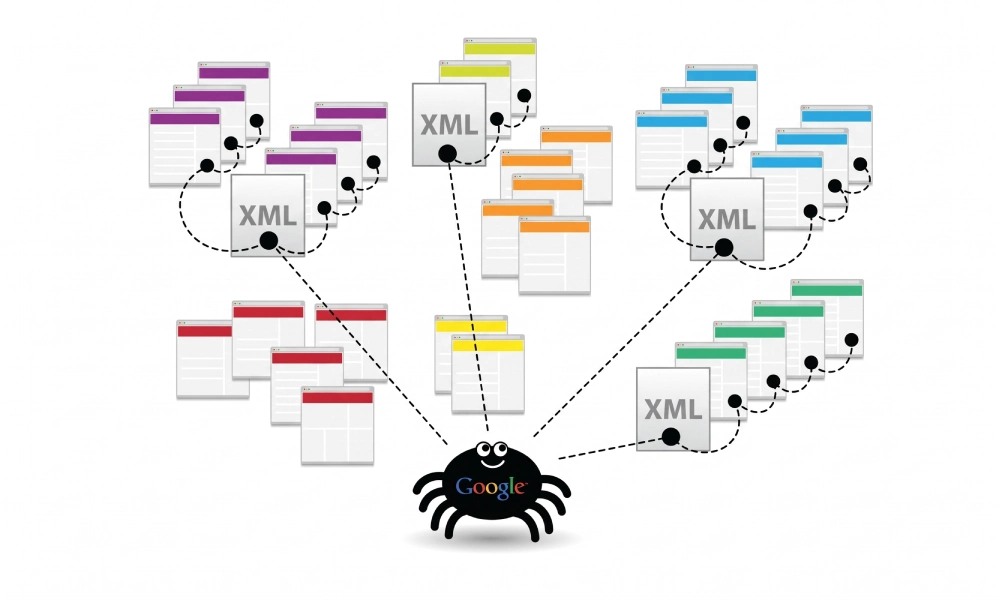
Want a Quick Summary?
Summarize this article instantly with ChatGPT.
Publishing high-quality content or launching an e-commerce catalog does not guarantee automatic inclusion in Google search results. Website owners frequently discover that newly designed landing pages, core service offerings, or refreshed blog posts fail to appear in search engine results pages (SERPs) even weeks after publication.
Indexation is a multi-stage pipeline: discovery, crawling, rendering, evaluation, and finally index storage. If a breakdown occurs at any stage, your organic search impressions remain at zero. Understanding why Google is not indexing your pages and how an XML sitemap resolves structural crawl hurdles is essential for maintaining consistent organic visibility.
The 6 Most Common Reasons Google Is Not Indexing Your Pages
When Googlebot bypasses or drops your URLs, the root cause usually stems from technical directives, crawl budget constraints, or algorithmic content thresholds:
1. "Crawled - Currently Not Indexed" Status in GSC
This status inside Google Search Console means Googlebot successfully reached and downloaded your page, but decided against adding it to the search index. This algorithmic exclusion typically points to thin copy, duplicate content across multiple URLs, poor internal linking, or a perceived lack of value relative to competing resources.
2. "Discovered - Currently Not Indexed" Status
This message confirms Google knows the URL exists, but has not yet crawled or rendered it. This indicates a crawl queue bottleneck. If Google encounters a slow server, high response latency, or an architecture filled with dynamic parameters, it reduces crawl frequency to avoid overloading your server.
3. Conflicting Robots Directives (Noindex Tags)
A simple configuration error can block indexation entirely. If an accidental <meta name="robots" content="noindex"> tag remains in the HTML head after staging deployment, or if an X-Robots-Tag: noindex HTTP response header is sent, Googlebot will obey the directive and de-index the page.
4. Deep Site Architecture and Orphan Pages
An orphan page is a live URL that has zero internal links pointing to it from other sections of your site. Similarly, pages nested four or more clicks away from the homepage receive very little internal PageRank. Googlebot rarely expends crawl depth to reach disconnected URLs.
5. Robots.txt Disallow Rules
If your robots.txt file contains a disallow rule blocking the folder housing your content (e.g., Disallow: /services/ or Disallow: /products/), Googlebot is forbidden from crawling the destination to evaluate the text.
6. Canonicalization Conflicts and Duplicate URLs
If Page A contains a canonical tag pointing to Page B, Google treats Page A as an alternate version and excludes it from the index. Similarly, non-standard URL handling (such as HTTP vs. HTTPS, www vs. non-www, or trailing slash inconsistencies) can split crawl authority across multiple variants.
Diagnostic Overview: Indexing Bottlenecks vs. Technical Causes
The table below summarizes common indexing failures reported in Google Search Console and their primary causes:
| Search Console Reported State | Pipeline Stage Failed | Primary Technical Cause | Primary Solution |
|---|---|---|---|
| Discovered - Currently Not Indexed | Crawl & Fetch | Crawl budget limits; slow server; poor discovery path | Submit via XML sitemap; improve internal links |
| Crawled - Currently Not Indexed | Evaluation / Quality | Thin content; duplicate text; weak topical authority | Expand unique value; consolidate duplicate variants |
| Excluded by 'noindex' Tag | Directive Parsing | Accidental meta robots or HTTP header directive | Remove noindex meta tag; verify canonical target |
| Blocked by robots.txt | Crawl Access | Disallow rule preventing bot access | Update robots.txt to permit Googlebot access |
| Alternate Page with Proper Canonical | Canonical Selection | Self-referencing canonical missing; points elsewhere | Ensure indexable page has self-referential canonical |
How an XML Sitemap Helps Fix Indexing Problems
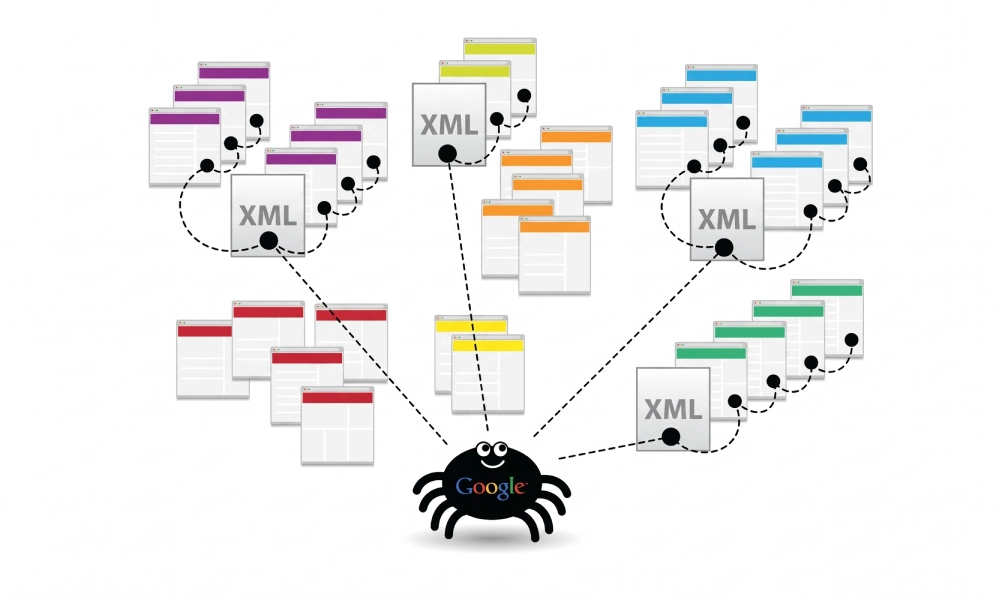
An XML sitemap is a structured, machine-readable protocol hosted on your server that communicates directly with Googlebot. Rather than forcing crawlers to discover content solely by wandering through links, a sitemap delivers direct technical solutions to common indexing bottlenecks:
1. Direct Feed for Immediate URL Discovery
A sitemap bypasses crawl depth limitations entirely. Even if a newly published page is three levels deep in your site architecture, including it in your sitemap places the absolute canonical URL straight into Google's discovery queue.
2. Recrawl Prioritization via the <lastmod> Tag
The XML protocol includes the <lastmod> timestamp, which informs Google when content on a specific page was modified. When you update an unindexed or outdated page with comprehensive information, an updated lastmod date signals to Googlebot that a fresh inspection is warranted.
3. Preserving Crawl Budget on High-Value Canonical URLs
Search engines allocate a finite crawl budget to every domain. An XML sitemap acts as a curated directory containing only indexable 200 OK canonical URLs. It strips out dynamic sorting parameters, duplicate variants, and redirected endpoints, focusing Googlebot's resources on revenue-generating pages.
4. Eliminating Orphan Content Vulnerabilities
If an essential landing page is accidentally omitted from main navigation menus, an XML sitemap ensures search crawlers still have an explicit path to locate and evaluate the resource.
Step-by-Step Recovery: How to Get Your Pages Indexed
Follow this systematic procedure to resolve indexation roadblocks across your domain:
- Audit URLs for Blocking Directives:
Inspect unindexed pages using Chrome DevTools or a source viewer. Confirm the HTML head does not contain
<meta name="robots" content="noindex">and verify yourrobots.txtfile does not disallow the parent folder. - Verify Canonical and Status Codes:
Check that the target page returns an HTTP 200 OK response code and that the
<link rel="canonical">points to itself rather than a different URL. - Generate a Clean, Protocol-Compliant Sitemap:
Ensure your sitemap lists only live, indexable destinations. For custom web architectures, headless setups, or CMS frameworks that produce irregular XML feeds, you can catalog your canonical paths and build an error-free file using a validated xml sitemap generator. This ensures your output adheres strictly to Sitemaps.org standards with properly escaped entities.
- Upload and Reference in Robots.txt:
Place your verified sitemap in your server root (e.g.,
/public_html/sitemap.xml) and declare its location at the bottom of yourrobots.txtfile:Sitemap: https://www.yourdomain.com/sitemap.xml - Submit to Google Search Console:
Navigate to Indexing > Sitemaps inside Google Search Console, submit your sitemap URL path, and confirm the submission registers a green "Success" status.
- Use the URL Inspection Tool for Priority Pages:
For urgent commercial pages, paste the URL into the top search bar in GSC, click Test Live URL to verify rendering, and click Request Indexing to place the page directly into Google's priority crawl queue.
Maintain Continuous Crawl and Index Hygiene
Diagnosing indexation failures requires distinguishing between access restrictions and content quality signals. By eliminating contradictory directives, enriching thin copy, organizing canonical destinations, and submitting a clean XML sitemap, you provide Googlebot with an unhindered crawl roadmap that supports fast and dependable indexation across your entire domain.
Looking for Measurable Business Growth?
Partner with BrandStory for end-to-end digital & creative excellence.


Are You Looking for Growth?
Free instant digital marketing audit and improve performance.
Get Graded Today
Transform Your Digital Growth with BrandStory
From SEO, PPC, social media marketing, and content marketing to website development, branding, and lead generation, BrandStory delivers result-driven digital marketing services in Dubai and across the UAE, helping businesses attract, engage, and convert more customers.
Trusted by 1000+ leading brands in Dubai and globally including:




Related Blogs
How to Create a Sitemap for Wix, Webflow, or Custom Websites
Search engines crawl billions of pages daily by traversing hyperlinks across the web. However, if your website relies ...
How to Create a Sitemap for Shopify: Setup and Submission Guide
For e-commerce merchants running stores on Shopify, search engine visibility is directly tied to store revenue. If sea...
How to Create a Sitemap for WordPress: Step-by-Step Guide
An XML sitemap is a critical technical blueprint for any WordPress website. It serves as a direct, structured director...
.webp)
How to Find and Fix Broken Links That Hurt Your Sitemap
An XML sitemap is supposed to represent the definitive inventory of your highest-value, fully functioning web pages. W...
.webp)
Crawl Budget: How Sitemaps Help Search Engines Crawl Your Site
Every website operates under computing and bandwidth constraints, and search engines like Google and Bing are no excep...
Sitemap Couldn’t Fetch or Has Errors: Fix It in Google Search Console
Submitting an XML sitemap to Google Search Console is intended to streamline crawl discovery and establish a direct co...

