
-
- Digital Marketing
-
 Perf. Marketing
 E-mail Marketing
 PPC Services
 Video Marketing
 Influencer Marketing
- Social Media
 Facebook Marketing
 Instagram Marketing
 Twitter Marketing
 Pinterest Marketing
 TikTok Marketing


-
- Digital Marketing
-
Perf. Marketing
- E-mail Marketing
- PPC Services
- Video Marketing
- Influencer Marketing
- Social Media
- Facebook Marketing
- Instagram Marketing
- Twitter Marketing
- Pinterest Marketing
- TikTok Marketing
Blog
Crawl Budget: How Sitemaps Help Search Engines Crawl Your Site
.webp)
Want a Quick Summary?
Summarize this article instantly with ChatGPT.
Every website operates under computing and bandwidth constraints, and search engines like Google and Bing are no exception. Googlebot does not have infinite time or server resources to crawl every single URL published across the web. Instead, automated bots evaluate domains within a calculated allocation known as crawl budget.
If your website squanders its crawl allocation on low-priority pages, infinite redirect loops, or parameter-heavy URLs, search crawlers may leave before ever reaching your primary commercial pages. Understanding crawl budget and leveraging XML sitemaps strategically gives webmasters control over how bots explore, prioritize, and index their site.
What Is Crawl Budget?
Crawl budget represents the total volume of URLs search engine bots can and want to crawl on a given domain within a specific timeframe before moving on. According to Google's technical documentation, crawl budget is determined by two distinct components:
- Crawl Rate Limit (Crawl Capacity): The technical threshold of how many concurrent connections your hosting server can support without degrading performance or slowing page load times for human visitors. If your server responds quickly with low latency, Googlebot raises the crawl rate limit; if your server begins returning 500-level errors or connection timeouts, Googlebot throttles down crawl activity immediately.
- Crawl Demand (Crawl Scheduling): How much Google actually wants to crawl your pages based on user interest and freshness. Popular URLs with high organic search traffic, strong inbound backlinks, and frequently updated content generate higher crawl demand than stale, static, or rarely visited subpages.
Who Needs to Worry About Crawl Budget?
While small websites containing fewer than a few thousand pages rarely exhaust Google's crawl resources, crawl budget management becomes critical in several architectural scenarios:
- Enterprise E-Commerce Platforms: Retailers managing tens of thousands or millions of product SKUs with dynamic filtering parameters (color, size, price sorting).
- Publishers and Media Outlets: News organizations publishing dozens of time-sensitive stories daily that must be indexed within minutes of breaking.
- Websites Undergoing Major Migrations: Domains executing site redesigns, structural URL changes, or protocol migrations that require massive 301 redirect re-crawling.
- Faceted Navigation Architectures: Any site that generates infinite dynamic URL variations through search forms or filters.
The Primary Causes of Crawl Budget Waste
When Googlebot spends time on non-revenue-generating URLs, crawl budget is wasted. The most frequent culprits include:
| Crawl Roadblock | How It Harms Crawl Budget | Recommended Technical Solution |
|---|---|---|
| Faceted Navigation & Filter Strings | Generates millions of duplicate URL combinations (e.g., ?sort=price&color=blue) |
Block filter strings in robots.txt or use canonical tags |
| Redirect Chains & Loops | Forces bots through multiple network hops (A → B → C → D) to reach one page | Flatten redirects to single 1-to-1 hops (A → D) |
| Soft 404 Errors | Empty pages that respond with HTTP 200 OK headers instead of true 404/410 codes | Configure server to return true 404 or 410 headers |
| High Server Latency / Slow TTFB | Slow response times trigger Googlebot's protective crawl rate throttling | Upgrade hosting, optimize database queries, implement CDN caching |
| Hacked or Injected URLs | Spam injection scripts creating thousands of rogue directories | Clean server code, patch CMS vulnerabilities, return 410 codes |
How XML Sitemaps Help Search Engines Maximize Crawl Budget
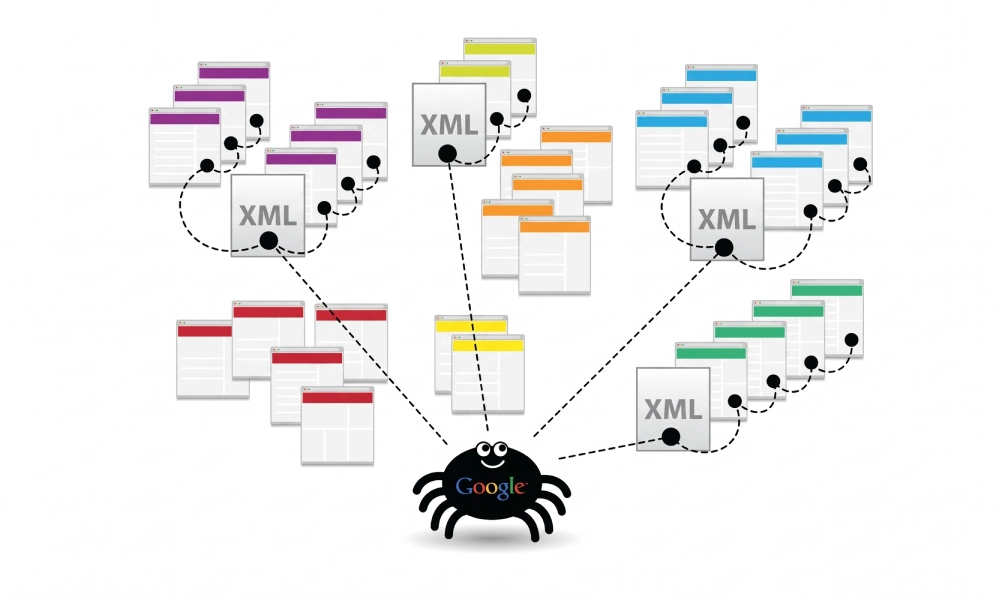
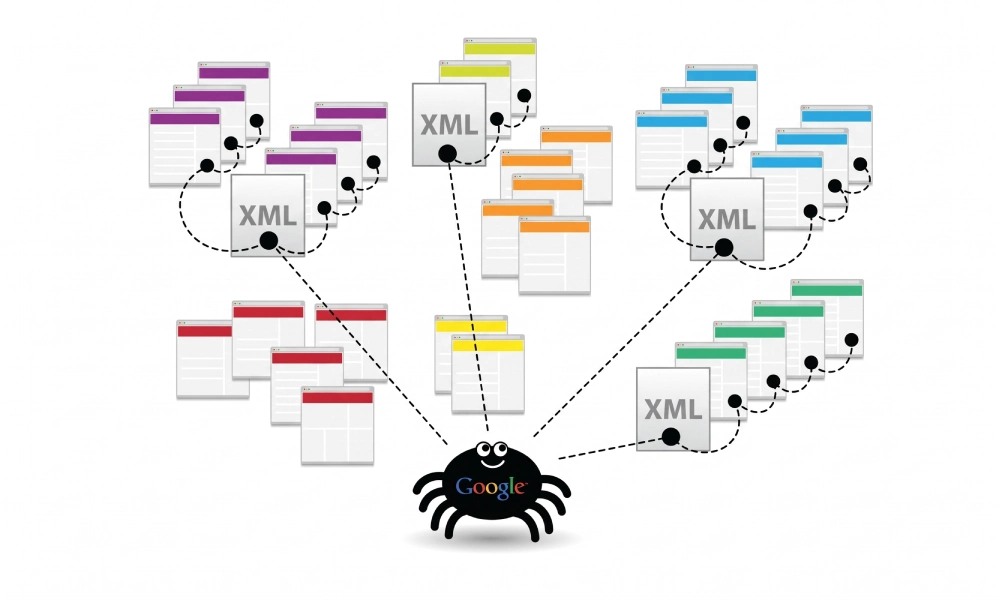
An XML sitemap functions as a direct, machine-readable guide that tells search bots exactly which URLs represent your definitive, authoritative pages. Rather than letting Googlebot wander aimlessly through nested links, a clean sitemap streamlines the crawling process:
1. Directing Crawlers Strictly to Canonical 200 OK URLs
A well-maintained XML sitemap contains only indexable, live 200 OK canonical addresses. By bypassing parameter variations, tracking tags, and redirected paths, the sitemap ensures Googlebot expends its crawl budget strictly on URLs that deliver business value.
2. Communicating Real Content Freshness via the <lastmod> Tag
Googlebot relies heavily on the <lastmod> timestamp in XML sitemaps to prioritize recrawling. When you update an important landing page with fresh data or expanded copy, updating the lastmod date informs the crawler that content has changed. Instead of blindly recrawling static pages, Googlebot targets the updated URLs directly.
<url>
  <loc>https://www.yourdomain.com/technical-guide/</loc>
  <lastmod>2026-10-17T09:00:00+00:00</lastmod>
</url>
3. Elevating Deep and Orphan Pages
Pages nested four or more clicks away from the homepage receive minimal PageRank and infrequent crawl attention. By listing deep pages directly within your sitemap, you give crawlers an immediate discovery entry point, preventing valuable pages from being skipped during scheduled crawl cycles.
4. Segmenting Architecture via Sitemap Index Files
For large websites with more than 50,000 URLs, organizing child sitemaps inside a sitemap index file (e.g., dividing products, categories, and editorial guides) allows you to monitor crawl efficiency per section in Google Search Console. If product indexation lags behind blog indexation, developers can diagnose template bottlenecks immediately.
Best Practices for Sitemap Hygiene to Protect Crawl Budget
A corrupted or poorly curated sitemap sends conflicting signals to crawlers, consuming crawl budget instead of conserving it. Follow these core hygiene standards:
- Never Include Non-200 Status Codes: Exclude 301/302 redirects, 404 broken links, and 500 server errors from your sitemap files. Crawlers should encounter only final destinations.
- Exclude Noindexed Pages: Listing a URL in a sitemap while applying a
noindexmeta tag creates contradictory instructions that confuse crawlers. - Purge Outdated Faceted Parameters: Ensure dynamic search or filter strings are excluded from your sitemap generator settings.
- Declare Your Sitemap in Robots.txt: Place a direct reference to your master sitemap URL at the bottom of your
robots.txtfile so all search engines locate it upon arrival:Sitemap: https://www.yourdomain.com/sitemap_index.xml
Monitoring Crawl Activity in Google Search Console
To evaluate how effectively Googlebot crawls your domain, review the official Crawl Stats Report inside Google Search Console:
- Log into Google Search Console and select your verified property.
- Navigate to Settings > Crawl stats in the left-hand sidebar.
- Review the top-level trend graphs:
- Total crawl requests: Identifies whether crawl volume is rising, stable, or declining.
- Total download size: Tracks how much bandwidth Googlebot consumes on your server.
- Average response time: A spike in response time directly correlates with a reduction in crawl rate limit. Keep this metric under 300 to 400 milliseconds.
- Inspect the breakdown tables below the charts:
- Crawl requests by response: Verify that 200 OK responses account for the vast majority of requests (ideally 95% or higher), with minimal 301 redirects, 404s, or 500 server errors.
- Crawl requests by purpose: Observe the balance between Discovery (finding new URLs) and Refresh (recrawling known URLs).
Protect Your Crawl Efficiency
Crawl budget determines how quickly search engines discover, evaluate, and index your content. By pairing rapid server response times with a clean, protocol-compliant XML sitemap, you eliminate wasted crawl hops and ensure Googlebot allocates its resources to your most important commercial assets.
Looking for Measurable Business Growth?
Partner with BrandStory for end-to-end digital & creative excellence.


Are You Looking for Growth?
Free instant digital marketing audit and improve performance.
Get Graded Today
Transform Your Digital Growth with BrandStory
From SEO, PPC, social media marketing, and content marketing to website development, branding, and lead generation, BrandStory delivers result-driven digital marketing services in Dubai and across the UAE, helping businesses attract, engage, and convert more customers.
Trusted by 1000+ leading brands in Dubai and globally including:




Related Blogs

How to Create a Sitemap for Wix, Webflow, or Custom Websites
Search engines crawl billions of pages daily by traversing hyperlinks across the web. However, if your website relies ...
How to Create a Sitemap for Shopify: Setup and Submission Guide
For e-commerce merchants running stores on Shopify, search engine visibility is directly tied to store revenue. If sea...

How to Create a Sitemap for WordPress: Step-by-Step Guide
An XML sitemap is a critical technical blueprint for any WordPress website. It serves as a direct, structured director...
.webp)
How to Find and Fix Broken Links That Hurt Your Sitemap
An XML sitemap is supposed to represent the definitive inventory of your highest-value, fully functioning web pages. W...
Why Google Is Not Indexing Your Pages (and How a Sitemap Helps)
Publishing high-quality content or launching an e-commerce catalog does not guarantee automatic inclusion in Google se...

Sitemap Couldn’t Fetch or Has Errors: Fix It in Google Search Console
Submitting an XML sitemap to Google Search Console is intended to streamline crawl discovery and establish a direct co...

