
-
- Digital Marketing
-
 Perf. Marketing
 E-mail Marketing
 PPC Services
 Video Marketing
 Influencer Marketing
- Social Media
 Facebook Marketing
 Instagram Marketing
 Twitter Marketing
 Pinterest Marketing
 TikTok Marketing


-
- Digital Marketing
-
Perf. Marketing
- E-mail Marketing
- PPC Services
- Video Marketing
- Influencer Marketing
- Social Media
- Facebook Marketing
- Instagram Marketing
- Twitter Marketing
- Pinterest Marketing
- TikTok Marketing
Blog
How to Submit a Sitemap to Bing Webmaster Tools: Step-by-Step Guide

Want a Quick Summary?
Summarize this article instantly with ChatGPT.
While Google often dominates technical search engine optimization discussions, Microsoft Bing powers a substantial share of global desktop search queries across Windows devices, Microsoft Edge, Office integrations, and conversational AI interfaces like Copilot. Overlooking Bing means neglecting millions of high-intent enterprise and desktop searchers.
Submitting an XML sitemap to Bing Webmaster Tools (BWT) is the fastest, most dependable way to ensure Bingbot discovers, evaluates, and indexes your canonical content. Learning how to submit a sitemap to Bing Webmaster Tools establishes a verified data feed between your hosting server and Microsoft's search crawler, giving you access to deep indexation diagnostics, crawl control settings, and technical SEO reporting.
Why Submitting to Bing Webmaster Tools Matters
Bingbot uses different crawling heuristics and resource allocation algorithms than Googlebot. Relying solely on automated hyperlink crawling across Bing can leave critical gaps in your search footprint:
- Fast Content Ingestion: Providing a direct sitemap feed prompts Bingbot to queue new landing pages and updated blog posts immediately without waiting for third-party backlinks.
- Ecosystem Syndication: Indexation in Bing directly feeds algorithmic search results across secondary search networks, including Yahoo Search, DuckDuckGo, and Microsoft Copilot summaries.
- Crawl Control Scheduling: Bing Webmaster Tools includes a dedicated "Crawl Control" feature allowing site owners to specify when Bingbot crawls their site (such as during low-traffic overnight hours), preventing server load spikes.
- Immediate Error Diagnostics: The BWT interface provides detailed feedback on XML parsing errors, HTTP status code failures, and non-canonical URL submissions.
Prerequisites Before Submitting Your Sitemap to Bing
Before submitting your sitemap inside the Bing Webmaster Tools console, ensure you have completed the following technical checks:
- Verify Site Ownership: You must have an active, verified Bing Webmaster Tools account. You can verify your property via DNS CNAME/TXT records, an XML authentication file placed in your root directory, an HTML meta tag in your homepage head, or by importing verified properties directly from Google Search Console.
- Serve Only HTTP 200 OK Canonical URLs: Every URL inside the sitemap must be an active, indexable destination. Do not include 301 redirects, broken 404 links, or pages marked with
noindextags. - Enforce Protocol Consistency: If your website enforces HTTPS, ensure every URL in your sitemap begins with
https://and matches your preferred domain format (www or non-www).
Step 1: Locate and Validate Your Sitemap URL
Before submitting, confirm that your sitemap is live, publicly reachable, and compliant with standard XML schemas. Common CMS endpoints include:
- WordPress:
https://www.yourdomain.com/sitemap_index.xml - Shopify:
https://www.yourdomain.com/sitemap.xml - Webflow, Squarespace, and Wix:
https://www.yourdomain.com/sitemap.xml
Open an incognito browser window and navigate directly to your sitemap URL. Verify that your server returns an HTTP 200 OK status code and that the document renders a clean XML tree without unescaped characters or database errors.
If you run a custom-coded web application, static site, or headless framework that lacks automated sitemap generation, you can crawl your architecture and build a validated file using an xml sitemap generator. Once generated, upload the resulting sitemap.xml file directly to your website's public root folder (e.g., /public_html/) so it resolves in a web browser.
Step 2: Submit the Sitemap in Bing Webmaster Tools
Once your sitemap is accessible on your server, follow these steps to register it inside Bing Webmaster Tools:
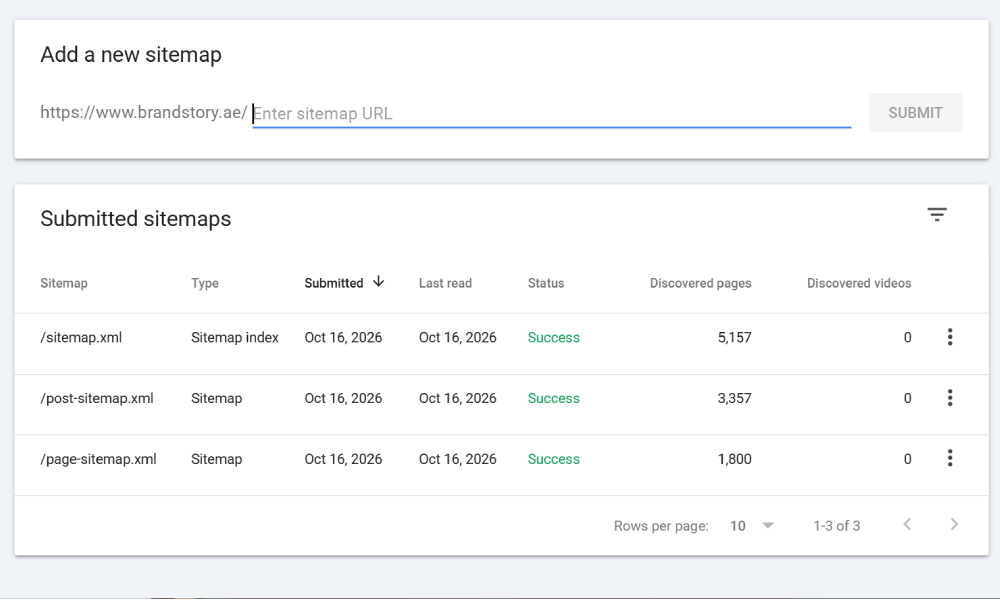
- Sign in to Bing Webmaster Tools:
Navigate to the Bing Webmaster Tools portal and log in using your Microsoft, Google, or Facebook account credentials.
- Select Your Verified Domain:
Click the site selector dropdown menu in the upper-left navigation panel and choose the website you want to manage.
- Navigate to the Sitemaps Section:
In the left-hand navigation menu under the Crawl or Configuration category, click on Sitemaps.
- Click "Submit sitemap":
Locate the blue Submit sitemap button located in the top-right corner of the interface.
- Enter Your Complete Sitemap URL:
In the text input field, enter the full, absolute URL of your sitemap or master sitemap index (for example:
https://www.yourdomain.com/sitemap_index.xml). Unlike Google Search Console, Bing requires the full URL including protocol and domain. - Click Submit:
Confirm the entry by clicking Submit. Your sitemap will appear immediately in the sitemaps dashboard table with an initial status of "Processing".
Step 3: Understand Bing Sitemap Status Codes
After submission, Bingbot will queue your sitemap for evaluation. Review the Status column in your dashboard to verify healthy ingestion:
| Status Label | Diagnostic Meaning | Recommended Technical Action |
|---|---|---|
| Success | Bingbot successfully downloaded and parsed the sitemap with zero protocol errors. | No action required. Bingbot will crawl discovered URLs based on its standard scheduling. |
| Processing | The sitemap has been queued and is currently being fetched and parsed by Microsoft systems. | Wait 24 to 48 hours for large sitemaps to complete their initial parse. |
| Errors | Bingbot encountered structural XML issues, invalid characters, or excessive broken URLs. | Click into the specific row to view line-item errors; correct the XML syntax on your server. |
| Failed | Bingbot was completely unable to access or download the sitemap file. | Check server response headers, verify DNS availability, and confirm robots.txt permissions. |
Troubleshooting Common Bing Sitemap Errors
If Bing Webmaster Tools returns an error or fails to process your submission, review the following potential failure points:
1. Server Block or Firewall Restrictions
Web Application Firewalls (such as Cloudflare, AWS Shield, or Sucuri) sometimes misidentify automated Bingbot requests as scraping attacks and challenge them with captcha screens. Ensure that legitimate Bingbot user-agents and IP blocks are whitelisted in your security firewall settings.
2. Disallow Directives in Robots.txt
Check your robots.txt file to ensure you have not blocked search crawlers from accessing the folder where your sitemaps live (such as Disallow: /sitemaps/). Bingbot must have unrestricted access to read and download the file.
3. Incorrect XML Encoding
Bing's XML parser strictly enforces XML entity encoding. Characters like ampersands (&), double quotes ("), and angle brackets (<, >) appearing inside URLs or titles must be properly encoded as standard entities (such as &). Unencoded characters cause immediate parsing failures.
4. Size and URL Limits Exceeded
Like Google, Bing enforces the standard limits of 50,000 URLs and 50MB uncompressed per sitemap file. If your site exceeds these boundaries, you must segment your links into multiple child files and reference them inside a parent sitemap_index.xml file.
Step 4: Declare Your Sitemap in Robots.txt
In addition to manual console submission, declare your sitemap directly in your robots.txt file. This ensures Bingbot (and every other compliant search engine crawler) automatically discovers your sitemap during routine site crawls:
- Open your
robots.txtfile located in your domain root. - Add a direct directive at the very bottom of the document:
User-agent: * Disallow: /admin/ Disallow: /checkout/ Sitemap: https://www.yourdomain.com/sitemap_index.xml - Save and publish the updated
robots.txtfile to your server.
Step 5: Configure Bing Crawl Control Settings
A unique and powerful feature inside Bing Webmaster Tools is the Crawl Control dashboard. Unlike Google, which automates crawl speed unilaterally, Bing allows site administrators to dictate the hourly rate at which Bingbot requests pages:
- Navigate to Crawl > Crawl Control in the BWT menu.
- Review the 24-hour visual grid representing each hour of the day.
- Set crawl activity to lower volumes during peak business hours to preserve server bandwidth for human visitors, and ramp up crawl intensity during overnight hours when traffic is low.
Maintain Scalable Sitemap Health
Submitting an XML sitemap to Bing Webmaster Tools ensures your website captures valuable organic search demand across Microsoft's global ecosystem. By verifying protocol syntax, referencing your sitemap in robots.txt, updating lastmod timestamps accurately, and monitoring Bing Webmaster Tools dashboards regularly, you establish a smooth, reliable crawl path that keeps your entire content inventory visible to prospective clients.
Looking for Measurable Business Growth?
Partner with BrandStory for end-to-end digital & creative excellence.


Are You Looking for Growth?
Free instant digital marketing audit and improve performance.
Get Graded Today
Transform Your Digital Growth with BrandStory
From SEO, PPC, social media marketing, and content marketing to website development, branding, and lead generation, BrandStory delivers result-driven digital marketing services in Dubai and across the UAE, helping businesses attract, engage, and convert more customers.
Trusted by 1000+ leading brands in Dubai and globally including:




Related Blogs

How to Create a Sitemap for Wix, Webflow, or Custom Websites
Search engines crawl billions of pages daily by traversing hyperlinks across the web. However, if your website relies ...
How to Create a Sitemap for Shopify: Setup and Submission Guide
For e-commerce merchants running stores on Shopify, search engine visibility is directly tied to store revenue. If sea...

How to Create a Sitemap for WordPress: Step-by-Step Guide
An XML sitemap is a critical technical blueprint for any WordPress website. It serves as a direct, structured director...
.webp)
How to Find and Fix Broken Links That Hurt Your Sitemap
An XML sitemap is supposed to represent the definitive inventory of your highest-value, fully functioning web pages. W...
.webp)
Crawl Budget: How Sitemaps Help Search Engines Crawl Your Site
Every website operates under computing and bandwidth constraints, and search engines like Google and Bing are no excep...
Why Google Is Not Indexing Your Pages (and How a Sitemap Helps)
Publishing high-quality content or launching an e-commerce catalog does not guarantee automatic inclusion in Google se...

