
-
- Digital Marketing
-
 Perf. Marketing
 E-mail Marketing
 PPC Services
 Video Marketing
 Influencer Marketing
- Social Media
 Facebook Marketing
 Instagram Marketing
 Twitter Marketing
 Pinterest Marketing
 TikTok Marketing


-
- Digital Marketing
-
Perf. Marketing
- E-mail Marketing
- PPC Services
- Video Marketing
- Influencer Marketing
- Social Media
- Facebook Marketing
- Instagram Marketing
- Twitter Marketing
- Pinterest Marketing
- TikTok Marketing
Blog
How to Do a Website Audit Step by Step: Technical & SEO Guide

Want a Quick Summary?
Summarize this article instantly with ChatGPT.
A website audit is the single most effective way to identify technical errors, improve organic search engine rankings, and convert casual visitors into paying customers. Rather than relying on guesswork, a methodical, step-by-step audit breaks your entire digital presence into actionable checkpoints: crawlability, on-page content, site speed, off-page authority, and conversion bottlenecks.
Whether you manage an enterprise e-commerce platform, a B2B portal, or a local service business, this comprehensive walkthrough demonstrates how to do a website audit step by step using industry-standard tools and proven optimization frameworks.
Prerequisites: Essential Tools Before You Begin
Before launching your audit, gather access to the following platforms to capture both laboratory diagnostics and live field data:
- Crawling Software: Screaming Frog SEO Spider, Sitebulb, or Lumar (for full URL extraction and structural analysis).
- Search Engine Diagnostic Dashboards: Google Search Console and Bing Webmaster Tools (for real-world indexing and status reports).
- Web Analytics: Google Analytics 4 (for traffic trends, dwell time, and user journeys).
- Speed & Performance Analyzers: Google PageSpeed Insights, WebPageTest, and Chrome DevTools (Lighthouse).
- Backlink & Competitive Analysis Suites: Ahrefs, Semrush, or Moz.
Step 1: Run a Full-Site Technical Crawl
Every thorough website evaluation starts with crawling your site exactly the way search engine bots do. Launch your preferred crawler (e.g., Screaming Frog) configured with your production domain.
- Scan for HTTP Status Codes: Export all URLs returning 4xx client errors (broken links) and 5xx server errors. Identify all internal links pointing to dead pages.
- Eliminate Redirect Chains & Loops: Ensure 301 redirects resolve directly to the final 200 OK target URL in a single hop. Multiple consecutive redirects waste crawl budget and add unnecessary latency.
- Detect Orphan Pages: Compare your crawler results against your XML sitemap and Google Analytics landing page reports to find valid pages that have zero internal inbound links.
Step 2: Inspect Robots Directives, Sitemaps, and Indexability
If search bots are inadvertently blocked from discovering your pages, the rest of your optimization efforts will not matter.
- Verify robots.txt: Review your
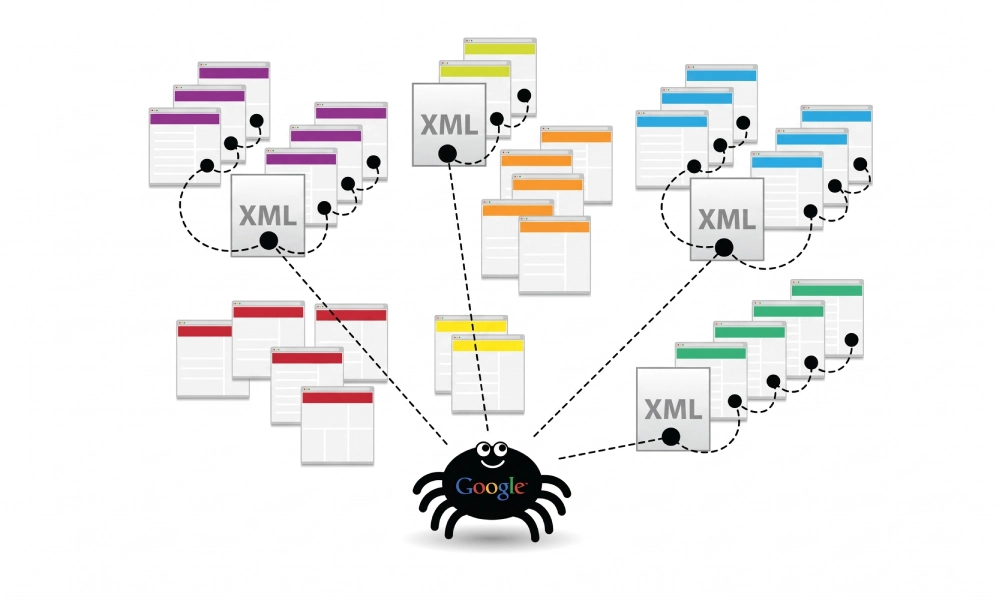
robots.txtfile to ensure critical resources (such as CSS, JavaScript, and main content folders) are not disbarred with accidentalDisallowrules. - Audit XML Sitemaps: Confirm that your sitemap is referenced within your robots.txt file, submitted to Google Search Console, contains only clean 200 OK URLs, and excludes canonicalized or noindex pages.
- Review Meta Robots Tags & Canonical Tags: Verify that every page has a self-referencing canonical tag or points directly to the preferred master URL. Check that commercial pages do not contain accidental
noindex, nofollowdirectives. - Diagnose GSC Index Coverage: In Google Search Console, review the Page Indexing report. Investigate pages categorized under "Crawled - currently not indexed" and "Discovered - currently not indexed" to pinpoint thin content or low authority issues.
Step 3: Analyze Architecture and Internal Linking
Your site architecture determines how easily users and search crawlers navigate your hierarchy and distribute internal page equity.
- Crawl Depth Analysis: Crucial landing pages and primary revenue drivers should be accessible within a maximum of 3 clicks from the homepage.
- Anchor Text Strategy: Internal links should feature descriptive, keyword-rich anchor text instead of vague phrases like "click here" or "learn more."
- Footer & Navigation Hierarchy: Confirm that header navigation menus and footer links are uncluttered, well-organized, and prioritize user intent without spamming site-wide boilerplate links.
Step 4: Conduct an On-Page SEO and Content Quality Audit
Once the technical scaffolding is sound, evaluate page-level content to ensure it accurately targets relevant search queries and satisfies searcher intent.
- Title Tags & Meta Descriptions: Look for missing, truncated, or duplicate title tags. Ensure primary search phrases appear near the beginning of the title tag and that meta descriptions provide a compelling reason to click.
- Heading Structure: Every page should have exactly one logical
<h1>tag reflecting the main topic, supported sequentially by<h2>and<h3>subheadings. - Thin and Duplicate Copy: Identify low-word-count pages or copied manufacturer descriptions. Consolidate competing URLs that trigger keyword cannibalization using 301 redirects or canonical tags.
- Structured Data Markup (Schema.org): Test key landing pages using Google's Rich Results Test. Implement accurate schema markup (such as Organization, Article, Product, FAQ, or LocalBusiness) to earn rich snippets in search results.
Step 5: Measure Page Speed, Mobile Usability, and Core Web Vitals
Page performance and mobile experience directly impact both search engine rankings and on-site conversion metrics.
- Core Web Vitals Thresholds:
- Largest Contentful Paint (LCP): Measures perceived loading speed. Target: under 2.5 seconds.
- Interaction to Next Paint (INP): Measures overall site responsiveness. Target: under 200 milliseconds.
- Cumulative Layout Shift (CLS): Measures visual stability during load. Target: score below 0.1.
- Image and Media Optimization: Convert legacy JPEG/PNG images to modern WebP or AVIF formats, enforce explicit width/height dimensions to eliminate layout shifts, and implement native lazy-loading on off-screen assets.
- Code Minification & Script Deferral: Minify CSS and JavaScript, eliminate unused code libraries, and defer non-critical third-party tracking scripts.
- Mobile Responsiveness: Test pages across various mobile viewport widths to ensure tap targets are spaced adequately and horizontal scrolling errors are eliminated.
Step 6: Audit Your Off-Page Profile and Backlink Health
A domain's authority and ranking capability rely heavily on the strength and cleanliness of its external backlink profile.
- Referring Domain Growth: Use tools like Ahrefs or Semrush to review the velocity of your referring domains over the past 12 months. Watch for sudden, unnatural link drops or spammy link spikes.
- Toxic Links & Negative SEO: Identify low-quality, automated, or manipulated backlinks originating from link farms or unrelated foreign-language networks. If necessary, prepare a targeted disavow submission.
- Broken Inbound Backlinks: Identify deleted pages (404s) that still receive high-authority external backlinks. Implement 301 redirects from those dead URLs to relevant, live landing pages to reclaim lost authority.
Step 7: Evaluate User Experience (UX) and Conversion Paths (CRO)
Bringing visitors to your website is only half the battle. Your pages must guide users seamlessly toward completing a transaction or submitting an inquiry.
- Form Simplicity: Audit lead capture and contact forms. Remove unnecessary input fields, verify real-time inline validation, and confirm that confirmation pages track correctly.
- Clear Calls to Action: Ensure high-contrast, action-driven CTA buttons appear prominently both above the fold and at logical conversion points throughout the copy.
- Trust and Credibility Markers: Verify the presence of visible security badges, authentic customer testimonials, verified case studies, and easy-to-find contact details.
Website Audit Stages, Tools, and Success Criteria
The table below provides a quick reference guide matching each audit stage to its primary tools and verification criteria:
| Audit Phase | Primary Focus Area | Recommended Tools | Verification / Success Metric |
|---|---|---|---|
| Phase 1: Technical Crawl | Broken links, redirect chains, server errors | Screaming Frog, Sitebulb | 0 broken links; 100% 1-to-1 redirect resolutions |
| Phase 2: Indexability | Robots.txt, canonical tags, XML sitemaps | Google Search Console | 0 valid pages mistakenly blocked; clean index coverage |
| Phase 3: Architecture | Crawl depth, anchor text, navigation structure | Screaming Frog, Visual Site Mapper | Target landing pages within 3 clicks of homepage |
| Phase 4: Content & On-Page | Title tags, headings, duplicate copy, schema | Semrush, Surfer SEO, Rich Results Test | Unique metadata across all URLs; valid schema markup |
| Phase 5: Speed & Vitals | Core Web Vitals (LCP, INP, CLS), mobile usability | PageSpeed Insights, Chrome DevTools | "Good" status across field Core Web Vitals data |
| Phase 6: Backlinks | Domain authority, toxic links, reclaimed 404s | Ahrefs, Moz Link Explorer | Reclaimed link equity; clean anchor profile |
| Phase 7: CRO & UX | Form completion rates, CTAs, conversion funnels | GA4, Hotjar, Microsoft Clarity | Reduced abandonment rates on primary lead flows |
Step 8: Prioritize Findings and Build an Action Plan
A website audit is only as valuable as the actions taken once it is complete. Do not attempt to fix every minor warning simultaneously. Instead, categorize your audit findings into an impact-versus-effort matrix:
- Critical Priority (Immediate Execution):
Issues directly causing revenue loss, severe ranking drops, or crawl failure—such as sitewide
noindexdirectives, broken checkout steps, 500 server crashes, or compromised security certificates. - High Priority (Next Sprint):
High-impact optimizations that drive ranking gains, including eliminating redirect chains, fixing Core Web Vitals failures on top revenue pages, revising canonical tags, and resolving keyword cannibalization.
- Medium Priority (Ongoing Optimization):
Incremental enhancements such as missing image alt text, rewriting non-performing meta descriptions, adding structured data schemas, and re-linking orphaned informational content.
- Low Priority (Backlog Maintenance):
Minor cosmetic inconsistencies, minor CSS/JS cleanup on low-traffic pages, and minor heading hierarchy adjustments on archived resources.
Conducting an In-House Audit vs. Hiring Specialists
While internal teams can run basic scans using automated platforms, resolving complex technical bottlenecks, such as faceted navigation index bloat, international hreflang conflicts, and complex JavaScript rendering often requires dedicated enterprise experience.
If you manage a business in competitive regional markets and want an exhaustive, developer-ready diagnostic roadmap, partnering with an experienced agency saves time and prevents costly errors. Explore professional website audit services in Dubai, UAE to identify hidden architectural roadblocks and elevate your search performance.
Summary Checklist: Next Steps
Performing a website audit step by step ensures no blind spots are left to chance. Crawl your domain, verify indexability, streamline site structure, upgrade on-page content, optimize page speed, evaluate external links, and remove friction along your conversion paths. By turning diagnostic data into an orderly, prioritized development roadmap, your website will maintain resilient search rankings and deliver consistent commercial returns.
Looking for Measurable Business Growth?
Partner with BrandStory for end-to-end digital & creative excellence.


Are You Looking for Growth?
Free instant digital marketing audit and improve performance.
Get Graded Today
Transform Your Digital Growth with BrandStory
From SEO, PPC, social media marketing, and content marketing to website development, branding, and lead generation, BrandStory delivers result-driven digital marketing services in Dubai and across the UAE, helping businesses attract, engage, and convert more customers.
Trusted by 1000+ leading brands in Dubai and globally including:




Related Blogs

How to Audit Title Tags and Meta Descriptions: A Technical Guide
Title tags and meta descriptions form the front line of organic search visibility. When a user conducts a search on Go...
Internal Linking Best Practices for Technical SEO and User Experience
Search engine optimization strategies often focus heavily on acquiring external backlinks. However, the internal hyper...

How to Audit Internal Links: Step-by-Step Technical Guide
Internal links are the structural pathways connecting the architecture of your website. While backlinks from external ...

How to Find Keyword Cannibalization: Practical Detection Guide
Keyword cannibalization occurs when two or more pages across the same website target the identical keyword, topic, or ...

How to Find Content Gaps on Your Website: A Practical Guide
Building high-performing search engine optimization campaigns requires more than publishing new articles on generic in...

How to Do a Content Audit for SEO: A Step-by-Step Guide
Publishing new blog articles, category pages, and service descriptions continuously without reviewing legacy assets le...

