Blog
What Is Indexing in SEO and Why It Matters?
Want a Quick Summary?
Summarize this article instantly with ChatGPT.
If your website is not indexed, it does not exist at least not to search engines. You could publish the most comprehensive, beautifully written content in your industry, but if Google has not indexed it, no one will find it through search. This is why understanding what is indexing in SEO is fundamental to every digital marketing strategy.
Indexing is the bridge between creating content and getting discovered. It is the process by which search engines like Google store, organize, and prepare your web pages for retrieval when users search. Without indexing, your pages are invisible. With proper indexing, your content competes for visibility, traffic, and conversions.
In 2026, indexing has become more complex. AI crawlers, mobile-first indexing, JavaScript rendering, and Core Web Vitals all influence how and whether your pages make it into search engine indexes. This guide from BrandStory explains everything you need to know about indexing how it works, why it matters, what can go wrong, and how to ensure your content gets the visibility it deserves. For expert help with indexing issues, check out our professional SEO services in Dubai.
What Is Indexing in SEO?
Indexing in SEO is the process by which search engines store and organize web pages in their databases so they can be retrieved and displayed in search results. After a search engine crawler discovers your page through crawling, it analyzes the content, processes it, and adds it to the index a massive digital library containing billions of web pages.
Think of the index as the catalog in a library. Crawling is someone walking through the library and noting what books exist. Indexing is adding those books to the catalog so when someone searches for a topic, the librarian knows exactly which books to recommend and where to find them.
When a user enters a query, the search engine does not scan the entire live web in real time. It searches its index the stored, processed version of the web and returns the most relevant results based on hundreds of ranking factors. If your page is not in the index, it cannot appear in results. Period.
At BrandStory's Dubai SEO agency, we treat indexing as the foundation of every SEO campaign. Without it, no amount of keyword optimization or link building matters.
How Search Engine Indexing Works: The Three-Stage Process
Search engines operate in three stages to make your content discoverable: crawling, indexing, and ranking. Understanding each stage helps you diagnose where problems occur.
Stage 1: Crawling
Crawling is the discovery phase. Search engines use automated programs called crawlers, spiders, or bots Googlebot being the most famous to find and fetch web pages. These crawlers follow links from known pages to new ones, building a map of the web as they go.
In 2026, multiple types of crawlers exist. Googlebot for traditional search indexing. Googlebot Smartphone for mobile-first indexing. GPTBot and ClaudeBot for AI training data collection. And specialized crawlers for images, videos, and news. Each has different behaviors and access patterns.
Crawlers discover pages through XML sitemaps submitted in Search Console, links from other indexed pages, submitted URLs, and discovered references across the web. If crawlers cannot reach your page, indexing cannot begin.
Stage 2: Indexing
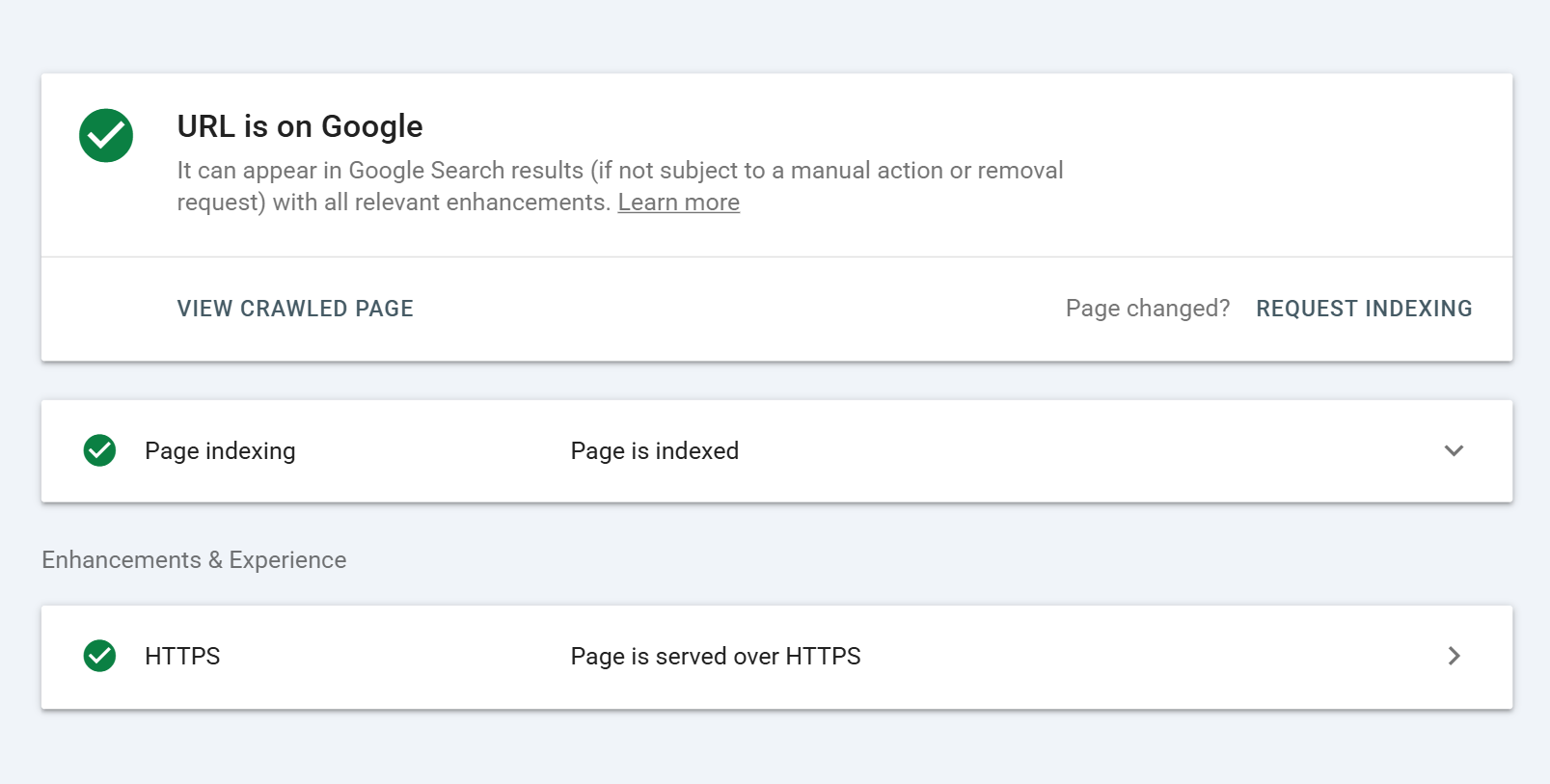
Once a page is crawled, the search engine processes it for indexing. This involves parsing the HTML and understanding the content structure, extracting text, images, videos, and other media, analyzing meta tags, headings, and structured data, evaluating content quality, relevance, and freshness, detecting duplicate or canonical versions, and assessing mobile usability and Core Web Vitals.
The search engine then decides whether to add the page to its index. Most pages are indexed. Some are excluded intentionally or unintentionally due to noindex directives, low quality, crawl errors, or duplicate content issues.
Stage 3: Ranking
Indexing makes your page eligible to appear in search results. Ranking determines where it appears. When a user searches, the engine retrieves relevant pages from the index and orders them based on ranking factors relevance to the query, content quality and depth, backlink authority, user experience signals, and hundreds of other signals.
Indexing is prerequisite to ranking. You cannot rank without being indexed. But being indexed does not guarantee ranking that requires optimization beyond mere inclusion in the index.
Why Indexing Matters More Than Ever in 2026
Indexing has always been important, but several developments in 2026 make it even more critical:
Mobile-First Indexing Is Now the Default
Google indexes the mobile version of your site first. If your mobile site has less content, different structure, or technical issues compared to your desktop version, your indexing and rankings suffer. Mobile-first indexing means your mobile experience is not just important it is the primary version Google evaluates.
JavaScript Rendering Complicates Indexing
Modern websites built with React, Vue, Angular, and other JavaScript frameworks often serve content dynamically. If search engines cannot render this JavaScript, they may index incomplete or blank pages. Server-side rendering and dynamic rendering have become essential for JavaScript-heavy sites.
AI Crawlers Require Accessibility
AI systems like ChatGPT, Perplexity, and Google Gemini crawl the web for training data and citations. If your content is not accessible to these crawlers or if you block them unnecessarily your content will not appear in AI-generated answers, reducing your visibility in emerging search surfaces.
Core Web Vitals Influence Indexing Efficiency
Slow, unstable pages waste crawl budget the number of pages Googlebot will crawl on your site within a given timeframe. Pages that fail Core Web Vitals thresholds may be crawled less frequently, delaying indexing of new and updated content.
Content Explosion Increases Competition for Index Space
With millions of new pages published daily, search engines have become more selective about what they index. Low-quality, thin, or duplicate content is increasingly excluded. Quality and uniqueness are now prerequisites for indexing, not just ranking.
How to Check If Your Pages Are Indexed
Before fixing indexing issues, you need to know what is and is not indexed. Here are the methods:
Google Search Console Index Coverage Report
The most authoritative source. Navigate to Index > Coverage in your Search Console property. Review four categories: Error pages that could not be indexed due to technical problems. Valid with warnings pages indexed but with issues that may affect performance. Valid pages successfully indexed. Excluded pages intentionally or unintentionally not indexed. Examine specific URLs in each category to identify patterns and problems.
Site: Search Operator
Type site:yourdomain.com into Google search. This returns all indexed pages from your domain. Compare the count to your total published pages. If the gap is large, you have indexing issues. You can also search site:yourdomain.com/page-url to check a specific page.
URL Inspection Tool
In Search Console, enter any URL into the URL Inspection tool at the top. It shows whether the URL is indexed, when it was last crawled, the canonical version Google selected, any crawl or indexing errors, and the rendered HTML Googlebot sees. This is the most detailed diagnostic available.
Third-Party Tools
Tools like Ahrefs, Semrush, and Screaming Frog can identify indexed and non-indexed pages at scale. They are useful for large sites where manual checking is impractical. Our Dubai SEO team uses these tools daily to audit client indexing health.
Common Indexing Issues and How to Fix Them
Even well-maintained sites encounter indexing problems. Here are the most common issues and their solutions:
Issue 1: Noindex Directives
A noindex meta tag or X-Robots-Tag header tells search engines not to index a page. This is useful for thank-you pages, admin panels, and duplicate content but disastrous when applied accidentally to important content.
Fix: Audit your site for noindex tags on pages that should rank. Check your CMS settings some platforms add noindex to new pages by default. Remove noindex from pages you want indexed, then request re-indexing through Search Console.
Issue 2: Robots.txt Blocking
Your robots.txt file tells crawlers which parts of your site they can access. If you accidentally disallow important directories or pages, crawlers cannot reach them and indexing cannot occur.
Fix: Review your robots.txt file at yourdomain.com/robots.txt. Ensure you are not blocking CSS, JavaScript, or important content directories. Use the robots.txt Tester in Search Console to validate. Remember: robots.txt blocks crawling, not indexing. If Google finds links to a blocked page, it may still index it without content showing a "blocked by robots.txt" warning.
Issue 3: Crawl Errors and Server Issues
Server errors (5xx status codes), not found errors (404), and redirect loops prevent crawlers from accessing your content. If Googlebot cannot fetch a page, it cannot index it.
Fix: Monitor Crawl Errors in Search Console. Fix server capacity issues causing 5xx errors. Implement proper 301 redirects for moved content. Remove or fix broken internal links. And ensure your hosting can handle crawl demand without timing out.
Issue 4: Duplicate Content and Canonical Issues
When multiple pages have identical or near-identical content, search engines may choose to index only one version and it might not be the one you prefer. Without proper canonical tags, your preferred page may be excluded while a duplicate is indexed.
Fix: Implement canonical tags on every page pointing to the preferred version. Use hreflang for multilingual content. Consolidate thin, similar pages into comprehensive resources. And monitor the Duplicate Content report in Search Console.
Issue 5: Orphan Pages
Orphan pages have no internal links pointing to them. Crawlers discover pages primarily by following links. Without links, orphan pages may never be crawled or indexed even if they are in your sitemap.
Fix: Audit your site structure with Screaming Frog or similar tools. Identify orphan pages and add contextual internal links from relevant, indexed pages. Ensure your XML sitemap is comprehensive and submitted to Search Console.
Issue 6: Low-Quality or Thin Content
Google explicitly states that low-quality, thin, or duplicate content may not be indexed. With the content explosion of 2026, search engines are increasingly selective about what deserves index space.
Fix: Audit your content for depth, originality, and value. Expand thin pages. Merge overlapping content. Remove or noindex pages that add no unique value. Focus on creating comprehensive resources that demonstrate E-E-A-T Experience, Expertise, Authoritativeness, Trustworthiness.
Issue 7: JavaScript Rendering Problems
If your content loads via JavaScript that Googlebot cannot execute, the crawler may see a blank or incomplete page. This is common with single-page applications and client-side rendered sites.
Fix: Implement server-side rendering (SSR) or dynamic rendering. Use the URL Inspection tool to view the rendered HTML Googlebot sees. Ensure critical content is present in the raw HTML, not loaded exclusively via JavaScript. Test with Google's Rich Results Test and Mobile-Friendly Test.
Issue 8: Hacked or Compromised Content
Hacked sites may have injected content that Google detects as malicious. This can trigger removal from the index entirely not just exclusion of specific pages.
Fix: Monitor Search Console for security issues. Run regular malware scans. Keep CMS, plugins, and themes updated. If hacked, clean the site thoroughly, request a review in Search Console, and document recovery steps.
How to Get Your Pages Indexed Faster
Sometimes you need indexing to happen quickly for a product launch, a timely article, or a critical update. Here are legitimate ways to speed up the process:
Submit URLs Directly in Search Console
Use the URL Inspection tool to submit individual URLs for indexing. This is the fastest method for specific, important pages. However, Google limits the number of submissions per day, so reserve this for high-priority content.
Submit an Updated XML Sitemap
When you publish new content or make significant updates, resubmit your XML sitemap in Search Console under Index > Sitemaps. This signals to Google that fresh content is available for crawling.
Build Internal Links to New Content
Links from established, indexed pages pass crawl priority to new content. Add contextual links from your homepage, category pages, or popular blog posts to newly published pages. This helps crawlers discover and index them faster.
Share on Social Media and Earn External Links
While social links are typically nofollow, they drive traffic and discovery. External links from indexed sites provide direct crawl paths to your new content. Promotion accelerates discovery and indexing.
Ensure Technical Excellence
Fast, stable sites with clean architecture are crawled more efficiently. Optimize Core Web Vitals. Fix crawl errors promptly. Maintain a shallow site structure where important pages are reachable within three clicks. And avoid unnecessary redirects that waste crawl budget.
Use Indexing APIs Where Available
For specific content types job postings, live videos, news articles Google offers indexing APIs that bypass normal crawl queues. If your content qualifies, these APIs can achieve near-instant indexing. Learn more about rapid indexing through BrandStory's technical SEO expertise.
Indexing in the Age of AI Search
By 2026, indexing is no longer just about Google Search. AI answer engines have created new indexing dynamics that smart SEO professionals must understand.
AI Crawlers and Training Data
AI systems like GPTBot, ClaudeBot, and PerplexityBot crawl the web to build training datasets and provide real-time answers. If these crawlers are blocked in your robots.txt, your content will not be included in AI-generated responses reducing visibility on emerging search surfaces.
Structured Data for AI Citation
AI systems rely heavily on structured, machine-readable content. Implementing Article, FAQ, HowTo, and Organization schema increases your chances of being cited in AI-generated answers. Clean HTML structure, concise definitions, and clear heading hierarchies also improve AI extractability.
Freshness Signals for Real-Time Queries
AI search prioritizes current information for time-sensitive queries. Regularly updating content, adding publication and modification dates, and using Indexing APIs for news content all signal freshness improving both traditional and AI search visibility.
Indexing Best Practices Checklist
Use this checklist to ensure your site is optimized for complete, efficient indexing:
- XML sitemap created, accurate, and submitted to Search Console
- Robots.txt reviewed not blocking important content or resources
- Noindex tags used intentionally not accidentally on valuable pages
- Canonical tags implemented on every page
- Internal linking structure connects all important pages
- No orphan pages without internal links or sitemap entries
- Core Web Vitals passing for mobile and desktop
- Mobile version contains all critical content from desktop version
- JavaScript-rendered content visible in server-side HTML
- Duplicate content consolidated or canonicalized
- Low-quality or thin pages removed, improved, or noindexed
- Hreflang tags implemented for multilingual content
- Structured data markup validated and error-free
- Security issues monitored and resolved promptly
- Crawl errors reviewed and fixed monthly
- Index Coverage report reviewed monthly
- New content promoted and linked for faster discovery
- AI crawlers not unnecessarily blocked in robots.txt
Why BrandStory Ensures Complete Indexing for Clients
At BrandStory, we know that indexing is where SEO begins. We are a leading SEO agency in Dubai, and our technical audits always start with indexability because a page that is not indexed cannot generate results.
Our comprehensive SEO services include full indexing audits using Search Console, Screaming Frog, and enterprise crawling tools. We identify noindex accidents, robots.txt blocks, orphan pages, JavaScript rendering failures, and duplicate content issues. We fix crawl errors, optimize site architecture, implement proper canonical and hreflang structures, and ensure your mobile experience supports complete indexing.
We understand the unique challenges of the Dubai and Middle East markets. Our bilingual team ensures your Arabic and English content is properly indexed, canonicalized, and discoverable across both language markets. Whether you need to recover from an indexing drop, launch new content rapidly, or build a technically sound foundation, we deliver solutions that work.
What distinguishes BrandStory is our proactive approach to indexing health. We do not wait for traffic drops to investigate. We monitor index coverage continuously, catch issues before they impact rankings, and keep your content discoverable in both traditional and AI search environments.
If you suspect indexing issues or want to ensure your site is fully discoverable, explore our SEO services in Dubai and let our technical team audit your indexability today.
Frequently Asked Questions
What does indexing mean in SEO?
Indexing is the process by which search engines store and organize web pages in their databases after crawling them. An indexed page is eligible to appear in search results. A non-indexed page is invisible to searchers.
How long does it take for a page to get indexed?
New pages on established sites may be indexed within hours or days. New sites or pages without internal links may take weeks. Submitting through Search Console, building internal links, and earning external links all accelerate indexing. Low-quality or orphaned pages may never be indexed.
Why is my page not indexed by Google?
Common reasons include noindex directives, robots.txt blocks, crawl errors, orphan status without internal links, low quality or thin content, duplicate content without canonical tags, JavaScript rendering issues, or manual actions. Use the URL Inspection tool in Search Console to diagnose the specific reason.
How do I get Google to index my page immediately?
Use the URL Inspection tool in Search Console to request indexing for specific URLs. Ensure the page has no technical barriers, internal links from indexed pages, and unique, valuable content. For qualified content types, use Google's Indexing API. Note that "immediate" still typically means hours to days, not seconds.
What is the difference between crawling and indexing?
Crawling is the discovery phase search engine bots fetch and analyze your pages. Indexing is the storage phase search engines add processed pages to their database for retrieval. A page can be crawled but not indexed if it fails quality checks or has exclusion directives.
Does noindex mean no crawling?
No. A noindex tag tells search engines not to include the page in their index, but they may still crawl it. To prevent both crawling and indexing, use noindex combined with robots.txt blocking though this is rarely recommended for valuable content.
Can I index a page without it appearing in search results?
No. Indexing makes a page eligible for search results. Ranking determines whether and where it appears. A page can be indexed but rank so poorly it effectively never appears. Conversely, a page cannot appear without being indexed first.
How does mobile-first indexing affect my site?
Google indexes the mobile version of your site as the primary version. If your mobile site has less content, different structure, or technical issues compared to desktop, your indexing and rankings suffer. Ensure mobile parity the same content, metadata, and structured data on both versions.
Why choose BrandStory for indexing optimization?
BrandStory is a top-rated Dubai SEO agency with deep expertise in technical SEO, indexability audits, and search engine compliance. We identify and resolve indexing barriers quickly, ensure your content is discoverable across traditional and AI search, and provide transparent reporting on index health.
Conclusion
Indexing is the invisible foundation of SEO. Without it, your content, keywords, and links mean nothing. With proper indexing, every optimization you make has the potential to drive visibility, traffic, and growth.
In 2026, indexing has grown more complex mobile-first requirements, JavaScript rendering challenges, AI crawler dynamics, and increased competition for index space all demand sophisticated technical execution. But the fundamentals remain: create valuable content, ensure technical accessibility, build logical site architecture, and monitor index health continuously.
The businesses that dominate search are not necessarily those with the most content. They are those with the most indexed content content that is discoverable, accessible, and eligible to compete for rankings.

Madhavan A
Madhavan A is a digital marketing expert with a strong SEO specialisation, bringing 8+ years of hands-on experience in driving organic growth and search visibility. He focuses on building data-driven strategies, optimising content performance, and delivering measurable results across competitive digital landscapes.
Are You Looking for Growth?
Free instant digital marketing audit and improve performance.
Get Graded Today
Transform Your Digital Growth with BrandStory
From SEO, PPC, social media marketing, and content marketing to website development, branding, and lead generation, BrandStory delivers result-driven digital marketing services in Dubai and across the UAE, helping businesses attract, engage, and convert more customers.
Trusted by 1000+ leading brands in Dubai and globally including:



Related Blogs
.webp)
What Is Organic Search? A Beginner's Guide to SEO
If your website is not indexed by Google, it is invisible to searchers. You could publish the most valuable, well-resear...
.webp)
What is On-Page SEO and Why Does It Matter for You
If your pages never appear in search results, your content might as well not exist. You can write the most detailed, val...
What Is Pagination in SEO? Everything You Need to Know
When your website pages are not indexed by search engines, they are invisible to potential visitors. You could create th...

A Complete Guide to Using Google's Disavow Tool
Backlinks are one of the most powerful ranking signals in SEO. But not all links help your site. Some can actively harm ...
What Is Cloaking in SEO? Why It Is a Black-Hat Tactic
If you have spent any time learning about search engine optimization, you have probably encountered the term cloaking. I...
What Is a Good SEO Score? A Complete Guide
If you have ever run your website through an SEO checker and stared at a number wondering what is a good SEO score, you ...





BrandStory is a premier digital transformation agency in Dubai. We excel in digital marketing, web design, and branding expertise to help UAE-based businesses connect, expand, and succeed.